
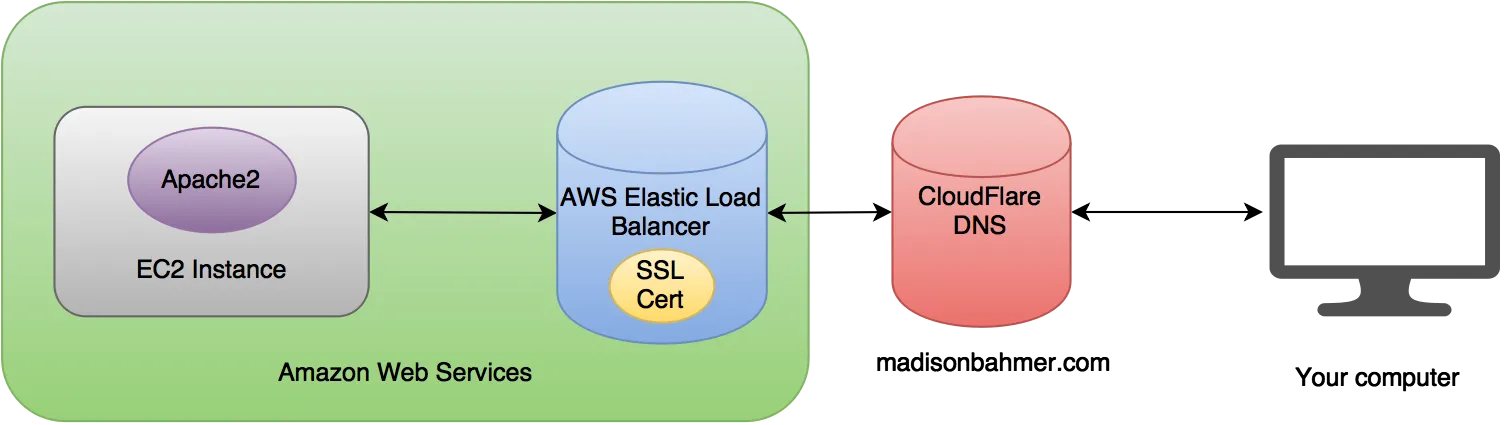
This is a small rant and hopefully helpful series of tips on how to set up a personal website using WordPress, Amazon EC2 instances, Elastic Load Balancers, SSL Certificates, and CloudFlare.
Since I literally just finished this, I may as well go into some technical details about how my website is now setup. Below is my personal site setup and probably doesn’t reflect everything a technical operations engineer would like, but I think it is pretty close. So be warned, technical jargon ahead.
I first stood up my EC2 instance that I wanted to install my website on.
AWS gives you a vanilla public IP address like 52.x.x.x. I took the time to setup my website, install my themes, configure security, set up the shop, and everything I could think of to get it looking perfect. The problem was that my website only worked by going to my public IP like 52.x.x.x in my browser. Well this was no good, since I wanted it to be my domain, madisonbahmer.com.
In combination with the above, the new Shop integration with Paypal requires me to use an SSL certificate and conduct all transactions over https. I certainly wasn’t going to pay for my own from a random SSL Certificate website and try to figure out how to set it up on my machine, so instead I utilized the AWS Certificate Manager which is FREE when you use an AWS Elastic Load Balancers (ELB). I was just fine with that too.
So I go through the trials of setting up a Certificate for madisonbahmer.com (which by the way, I screwed up once) and now I have this crazy url that directs traffic to my personal EC2 instance.
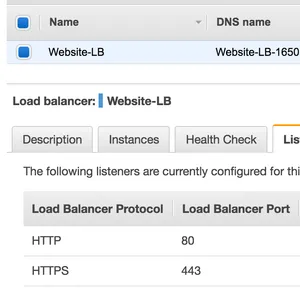
Great, it listens to both http and https and then directs traffic to my EC2 instance’s website. Now, when I hit the crazy load balancer address like Website-LB-XXXXXXXX.us-west-1.elb.amazonaws.com, it redirects to my 52.x.x.x domain and you can see my website. First off, this was confusing to me because I expected the ELB’s address to remain in the browser url, not my raw instance IP address, and second, I was now stuck.
The reason I was stuck is that I had been trying to both configure my website to flip over the new https://www.madisonbahmer.com AND apply my CloudFlare updates at the same time. Within Wordpress, when you change your site url over from 52.x.x.x to say https://www.madisonbahmer.com, I also needed to resolve my DNS resolution settings at the same time in CloudFlare. So I would flip the settings, my site would go down, and then I would be frantically trying to flip my DNS resolution settings over from my old website to this new one (which is ideally almost an instantaneous transition if I do it right). The problem was that in CloudFlare, an A type record requires an IP Address, where as my ELB only had a long url.
This had been driving me crazy for a couple of weeks. Nothing I seemed to do, read on Stack Overflow, google around, etc would get my darn site back working. So after the night was over, I would flip it back to my old site IP Address in CloudFlare and start fresh the next day, and repeat. My “new” website remained accessible only at its IP Address.
By some shear amount of luck or idiocy I fired my computer up again today and toyed around with the settings once again. I decided this time to convert my site to https://www.madisonbahmer.com (notice the new www), and I pointed my CNAME record in CloudFlare from www -> Website-LB-XXXXXXXX.us-west-1.elb.amazonaws.com. What do you know? When I went to https://www.madisonbahmer.com I got an SSL Certificate error (this is how I found out I had the wrong certificate on my load balancer, AND that I was finally hitting the ELB). Once I fixed that, cleared my browser cache, my site came up just fine. Note that I had originally requested my certificate to be valid for madisonbahmer.com ONLY, where as my new certificate I asked for *.madisonbahmer.com and the normal url. This fixed that issue.
Side note, this is the link to CloudFlare’s documentation on how to set up an ELB with your site. No where does it say the Name field should actually be your server domain name or prefix (like www). Maybe I just did’t understand, but I was thinking “elb” in their example was just a reference to my existing A name settings, which mapped from madisonbahmer.com -> my older website IP address.
At this point, I knew I had it on the run, but I could not figure out how to configure CloudFlare to redirect my older http based site to my new fancy https://www site. A quick google search brings up this or this, both of which actually don’t do what I expected. I wasted an hour’s worth of my time trying to 301 redirect https://www.madisonbahmer.com to https://www.madisonbahmer.com, then 301 redirect https://www.madisonbahmer.com to https://www.madisonbahmer.com…. nothing worked, except for the https://www site if I put it directly into the url.
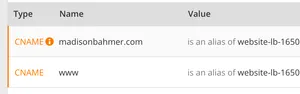
Then, I realized that my CloudFlare DNS configuration might really be that simple. Just apply madisonbahmer.com as a CNAME to redirect to my Elastic Load Balancer. What do you know? it worked! At time of writing I can now do:
And all of them resolve to the proper destination! Finally! My final mini simplified architecture diagram looks like the following:
Hopefully this saves me the pain of when I have to do this again, and it saves some pain for others as well. While I am not an expert by any means, I ran into all of the above and now am at a happy place with my website.